AI Face Generation
Generate photorealistic faces in seconds and send the best shots straight into Upscale, Video or Carousel workflows.
Written By Arina ZenCreator
Last updated About 1 month ago
What the AI Face Generation tool does
AI Face Generation converts a set of appearance parameters — gender, age band, ethnicity, hair & eye details, body type, beard, makeup — into unique portraits in ≈15s. Every result is royalty-free for commercial use and can cascade automatically into any other Openmov tool.
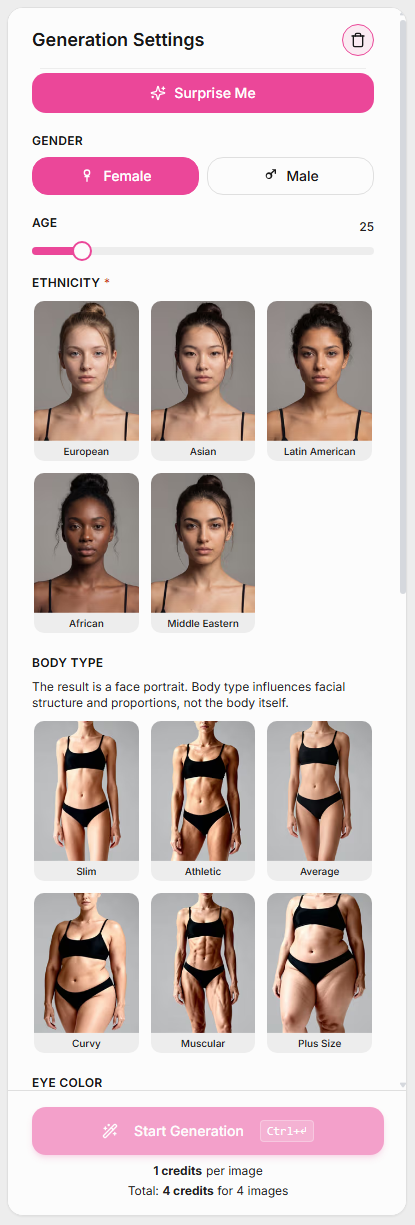
Interface tour
Surprise Me (big purple button, top)
Quickly fills the generator with a random combination of settings — perfect for inspiration, testing different looks, or rapid batches.Gender (required)
Choose between Female and Male. Some appearance settings change depending on the selected gender.Age (required)
Adjust the slider to define the approximate age of the generated character.Ethnicity (required)
Select the character’s ethnicity — European, Asian, Latin American, African, or Middle Eastern.Body Type
Choose the body shape of the character — Slim, Athletic, Average, Curvy, Muscular, or Plus Size.Eye Color
Select the eye color for the generated character. Both natural and stylized shades are available.Hairstyle
Choose the hairstyle — Straight, Wavy, Curly, Kinky/Coily, Braided, Bun, or Ponytail.Hair Color
Select a natural or fantasy hair color, including Blonde, Brown, Black, Ginger, Gray, Green, Blue, Violet, or Pink.Start Generation
Starts the generation process using your selected settings. The credit cost per image is displayed below the button. Fields marked with a red asterisk are required.
Quick-start walkthrough

Choose traits or smash Surprise Me.
Confirm the cost and hit Start Generation. A task tile appears on the left (“facegen-YYYY-MM-DD-HH-MM-ID”).
Watch status – Created → Processing → Completed / Failed. Time-outs auto-retry once; persistent fails are flagged.
Click the task tile (or View X/4 Generations) to open the Results page.
Actions on results

Select / Deselect: Use the checkbox in each thumbnail corner.
Retry Failed: visible if any of the four render errors out.
Send Selected to Tool or to Publishing: open the mini-launcher for Upscaler, Generator by Ref, Video Generator, or Carousel.
Download Selected / Download All: one-click ZIP export.
Create Cloud Archive: store images straight to your connected S3 or Google Drive bucket.
Pro tips
Batch like a pro → queue 50+ jobs; GPU auto-scaling keeps average wait ≈15 – 25s.
Use Surprise Me three times, favourite the best eight faces, then pipe to Upscale → Carousel for a polished “Meet the Team” social post in under five minutes.
FAQ
How many faces per run?
From 1 to 4.
Do I own the images?
Yes — full commercial license, no attribution needed.
Can I upload a reference face?
For matching style or expression, yes — use Generator by Ref after your first run.
Troubleshooting
Task failed?
Try restarting it using Retry. If the issue persists, contact support and we’ll take a look.
Blurry outputs
Send directly to Upscaler.